NanoFarfield: A Portable Far-Field Antenna Measurement Platform (Coming Soon to Crowdfunding)

Thank you to Antenom Antenna Technologies for submitting news about the upcoming crowdfunding campaign for their "NanoFarfield" antenna far field measurement system.

When building and measuring antennas, most people stop at measuring VSWR. However, VSWR is only a small part of the picture for antenna performance. The antenna's far-field pattern determines its gain in a particular direction. Measuring this is typically difficult as it requires a signal source, hiring and travelling to an expensive anechoic chamber, and some sort of automated system to rotate the antenna 360 degrees.

In recent posts, we've seen low-cost DIY solutions explored that use a NanoVNA or RTL-SDR to measure an antenna in an open field (to avoid multipath reflections like an anechoic chamber would) at various points, and then charting the results. However, this is a slow, manual process and requires purchasing and setting up various individual components.

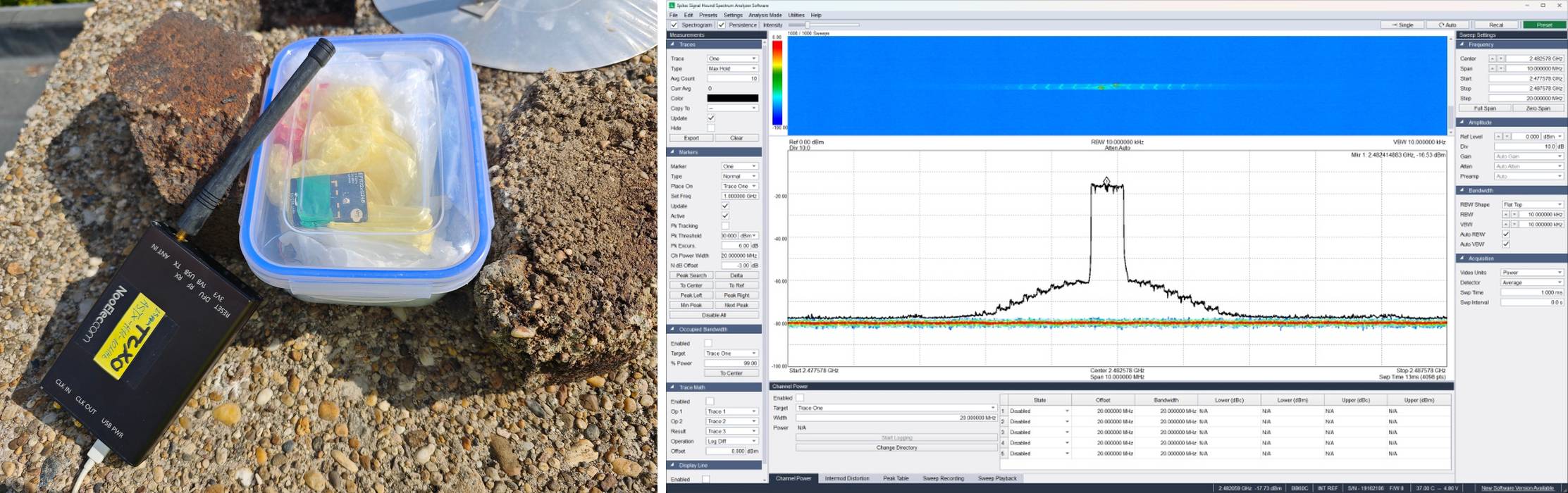
NanoFarfield productizes the low-cost approach, providing a portable measurement system that can be brought into an open environment. The measurement process is automated, by using a motorized rotator which spins the antenna under test 360 degrees in front of a directional signal source. The team write:

As many SDR users know, building antennas is relatively easy, but measuring the actual radiation pattern is often difficult. Normally this requires an anechoic chamber or a large outdoor antenna range, which is usually inaccessible to hobbyists, students, and small labs.

We have been working on a portable antenna measurement system called NanoFarField, designed to measure antenna radiation patterns outside the lab using commonly available VNAs such as NanoVNA or LiteVNA.

Instead of requiring a full antenna range facility, the system allows users to perform radiation pattern measurements in open environments using a compact rotating platform and VNA-based S21 measurements. The goal is to make antenna pattern measurement accessible to:

• SDR and ham radio experimenters
• antenna designers and RF engineers
• universities and student labs
• field testing scenarios

The system effectively acts as a portable antenna range that can fit into a backpack.

Typical workflow:

The antenna under test is placed on the rotating platform.

A reference antenna is positioned at a fixed distance.

The NanoVNA / LiteVNA performs S21 measurements while the antenna rotates.

Software reconstructs the radiation pattern from the measurement data.

This allows users to measure:

• azimuth radiation patterns
• antenna directivity trends
• relative gain patterns
• beamwidth and nulls

without requiring an expensive measurement facility.

Because many SDR enthusiasts design and build their own antennas, we thought this tool could be useful for the community as a low-cost method to visualize antenna performance.

The frequency range is specified at 50 - 6000 MHz, with a typical angular resolution of 1 degrees, and it includes a wideband amplifier to improve results. The hardware is provided as open source, however, the software will be closed source, and provided as a Windows executable. 

NanoFarfield: Low-Cost Antenna Far-Field Measurement System (50–6000 MHz)

JoesScanner: A Modern Frontend for Trunking Recorder to Listen, Browse, and Download Calls

Thank you to Joe for submitting news about the release of his project called "JoesScanner". JoesScanner is an app for Windows, Android, and iOS that provides a modern frontend for Trunking Recorder, for listening to, browsing, and downloading trunked radio calls.

A trunked radio call uses dynamically assigned frequencies from a shared pool, so tracking a conversation requires trunking software (e.g., Unitrunker, SDRTrunk, DSDPlus) and typically two RTL-SDRs, one for the control channel and one for the voice channel.

Trunking Recorder is a Windows application for recording/importing audio from trunked radio systems monitored by Unitrunker, SDRTrunk, ProScan, or DSDPlus. While Trunking Recorder already has a web-based browser front-end viewer, Joe was not happy with it and decided to build his own.

Joe writes:

Joe’s Scanner is a Windows, Android, and iOS app that connects to a Trunking Recorder (TR) backend and provides a modern front end for listening, browsing, and downloading calls.
The idea is to make TR based setups easier for end users, especially on mobile, while staying lightweight and ad free.

Key features:

- Connects to any Trunking Recorder server over HTTP or HTTPS, with or without username/password
- iOS background audio support
- History browsing with downloadable calls
- If the TR installation provides transcriptions, the app can enable address detection and what3words detection
- Free to use with no ads, and no data harvesting or resale

Background:

I built it because I run my own TR servers and was not happy with the existing client options, so I created what I wanted for my customers.

I am also making it available for anyone to use with their own TR servers for free.

Server owners can optionally apply to have their server listed in the in app directory to simplify setup for their users:
https://joesscanner.com/support/joes-scanner/joes-scanner-server-addition/

Microsoft Store: https://apps.microsoft.com/detail/9n5hbztcnt4t?hl=en-US&gl=US

Google Play: https://play.google.com/store/apps/details?id=app.joesscanner.com

Apple App Store: https://apps.apple.com/us/app/joes-scanner/id6758413482

Joe notes that the code is all open source and is available on GitHub.

JoesScanner - Mobile Interface

CoronaSDR for iOS – A Free Native RTL_TCP Client

Thank you to Silviu YO6SAY for writing in and sharing with us news about the release of his iOS App called "CoronaSDR" which is a native client for receiving from rtl_tcp servers. rtl_tcp is a server program for RTL-SDRs that streams raw IQ data over a network connection.

Unlike Android, iOS does not allow third-party USB devices like the RTL-SDR to run on its devices. But you can set up an rtl_tcp server on a networked PC or Raspberry Pi in your home, and connect to the data stream with an iOS app like CoronaSDR.

Silviu writes:

CoronaSDR is a free, native iOS app that connects to an rtl_tcp server on your local network (no cloud, no subscription).

Current features
• Live spectrum + waterfall (Metal / GPU-accelerated)
• Demod modes: AM / NFM / WFM / USB / LSB / CW
• RF controls: gain, PPM, direct sampling, offset tuning, bias-tee
• Stations with tags + CSV/TSV import/export
• List/range scanning with squelch hold/skip
• Background audio + lock screen controls

Known limitations (early build)
• Built solo so far — no external testers yet
• Most real-world testing to date has been NFM and WFM
• Other modes are implemented, but I’d consider them early until more field feedback comes in

Tested with an RTL-SDR Blog V4 (R828D) on a Raspberry Pi running rtl_tcp.

I’d really appreciate detailed feedback (device + iOS version, tuner type, rtl_tcp command, mode/frequency, and steps to reproduce any issues).
 
CoronaSDR - RTL_TCP Client for iOS Devices.

Exploring the Privacy Risks of Tire Pressure Monitoring Systems with RTL-SDR

Tire Pressure Monitoring System (TPMS) privacy concerns are a topic that comes up every now and then. Most modern vehicles have wireless tire pressure sensors that communicate with the vehicle's computer to alert the driver when tire pressure falls below a safety threshold.

The privacy issue is that these TPMS sensors each transmit a unique identifier, so the computer can know which tire is being measured, and not read other vehicles' sensors by mistake. As TPMS is not encrypted in any way, anyone with an RTL-SDR or other similar radio can receive and decode TPMS messages, including the unique identifier. This raises privacy concerns as this can be used to log the presence and movement of individual vehicles. 

A recent academic paper by university researchers showed how researchers deployed simple RTL-SDR + Raspberry Pi-based receivers along a road over a period of 10 weeks. They showed that TPMS transmissions can not only be used to identify, track, and detect the presence and daily routines of individual vehicles, but also to determine the type and weight of the vehicle via pressure readings.  Interestingly, they also note that variations in the weight of an identified vehicle could indicate, for example, whether a truck is loaded or unloaded, or whether there are additional passengers in a car.

The researchers highlight privacy concerns, noting that such data could be collected and sold by data mining companies without the driver's knowledge. 

RTL-SDR + Raspberry Pi for TPMS Monitoring
The TPMS Monitoring Setup

Frugal Radio: Beginners Guide to P25 Decoding with the Latest DSD Plus Release

Over on his YouTube channel 'Frugal Radio', Rob has uploaded a comprehensive video detailing how to set up the latest DSD Plus release for P25 Public Safety decoding.

Back in December 2025, we posted about how the DSD Plus team released version 2.547. The release had already been available to DSD Fastlane customers, but it is now available to the public. The new version brings various improvements and features, but it also changes the software signal flow that was used in previous versions.

In the video, Rob explains how to set up the new DSD Plus version, including how to use the new FMP24 demodulator with an RTL-SDR. He then goes on to show the various features, like control channel monitoring mode, getting P25 system data, holding and IDing talkgroups, and setting talkgroup aliases.

HUGE free DSDPlus Update 2026 : Decode P25 Public Safety with your SDR and this beginner guide!

Discovery Drive Campaign Launching Soon

Our Discovery Drive campaign will be launching soon, so make sure to sign up for updates on the pre-launch page!

Discovery Drive is an automatic antenna rotator that is designed to be used with our Discovery Dish product, as well as similarly sized antennas such as Wi-Fi grid and Yagi antennas.

A motorized rotator, such as Discovery Drive, enables precise tracking of fast-moving polar orbiting satellites using a satellite dish or directional antenna. Examples of polar orbiting weather satellites include METEOR-M2, METOP, and FENGYUN. Depending on your location, you may also have access to other interesting satellites that dump data over specific regions.

Apart from public weather data, operators and enthusiasts might be interested in using Discovery Drive to track CubeSats, and amateur radio operators may wish to track amateur radio satellites.

Amateur radio astronomy hobbyists can map the galaxy in the hydrogen line spectrum using Stellarium, or custom software to aim a Discovery Dish with H-Line feed, allowing you to scan multiple parts of the sky in one night.

Please check out our promo video below!

Discovery Drive Promo Video

Echo iOS KiwiSDR & OpenWebRX App now in Beta Testing

Back in January, we first posted about "Echo", an upcoming iOS app designed for browsing global web-based KiwiSDR and OpenWebRX software-defined radios.

Mark now notes that Echo is now in beta, and has been released to testers via TestFlight. He notes that new users can access the beta by making a small donation on his Ko-fi page. Mark writes:

Users have already reported being able to listen to some euro ham chat on their bike ride today. Where they’d usually have to put their entire iPhone in that locked guided access mode to block touch inputs on Safari, Echo allows multitasking & lock screen playback. For every SDR, any frequency. Someone else throwing the phone in their pocket & taking their walk with AirPods in their ear listening to CW. This was truly the most requested feature by far.

I’ve made several improvements since we last talked, even added support for not just Kiwi & OpenWebRX but also WebSDR & FM-DX. All built in. Over 2000+ global tuners at people’s fingertips. 11,000+ frequencies in a categorized database.

If you were unaware, OpenWebRX is a piece of server software that allows you to access and share SDRs over a network connection, such as the internet, via a web browser interface. OpenWebRX is a core component of the KiwiSDR, an SDR designed to operate as a shared receiver over a network connection. Around the world, many people have set up public KiwiSDR, RTL-SDR, and other SDR systems accessible via OpenWebRX. Echo is designed to make it easy to search for and view public OpenWebRX receivers on iOS devices.

EchoSDR Beta Screenshots
Echo iOS Beta Screenshots

Khanfar Software: Analog Radio Hunter

Recently, M. Khanfar released a new free program, "Analog Radio Hunter," described as a "professional RF analysis and monitoring application built around GNU Radio and Fosphor." The software currently supports RTL-SDR, Airspy, and HackRF. Khanfar writes:

Analog Radio Hunter is a professional RF analysis and monitoring application built around GNU Radio and Fosphor.

It is designed to scan large RF spans, quickly lock onto active signals, and monitor analog transmissions with NFM, AM, or WFM audio demodulation.

  • Real-time FFT + waterfall spectrum display
  • Fast scan with dwell, pause-on-squelch, and skip-ignored channels
  • Detection list with hits, timestamps, and smart deactivation
  • Favorites profiles with monitor and favorites-only scan modes
  • Built-in recorder with auto-record and event log
  • Dedicated WFM broadcast receiver with presets
  • Multi-SDR device support (RTL-SDR, Airspy, HackRF) with auto-detect and device switching
  • NFM and AM audio demodulation (in addition to WFM)
  • Peak-follow in span (auto-tune to strongest signal inside the current MS/s window)
  • Frequency list filtering to skip/mute ignored channels
  • Scan and detection profiles (save/load named presets)
  • PPM correction for RTL-SDR calibration
  • Spectrum interaction controls (cursor readout, click-to-tune, wheel step, drag-pan)
  • Recorder options (record when muted, timestamp/frequency in filename, beep on favorite)
  • WFM de-emphasis selection (50/75 µs) and preset management
  • Audio Output menu with refresh (route audio to speakers, VB-Cable, or USB output)
  • Signal Stability Filter with Min Open + Grace timing and per-target routing
  • Histogram IQ Rec with live IQ follow controls and inspectrum integration
  • Auto Squelch Calibrate (noise floor + margin) for faster field setup
  • Smart Deactivate dual-layer logic (time-based + hit-rate busy rule)
  • Favorites cooldown auto-reactivation for busy channels
  • Favorite TX tones (Tone 1-9), edge selection, and tone test buttons
  • Learning Mode hover guidance for faster onboarding
  • Status bar live metrics for Last, Active, Favorite, Peak SNR, and Level
Unique scanning and detection approach: Traditional sweep scanners only see the center frequency they step to. Analog Radio Hunter monitors an entire chunk of spectrum at once and reacts to peaks inside it. That is a major differentiator.
 

High-Impact Capabilities

  • Wide-span reactive scan engine that hunts activity across a full chunk, not one center point at a time.
  • One-click IQ capture and histogram visualization with follow and idle flow controls.
  • Carrier-resilient channel management using Smart Deactivate + favorites cooldown logic.
  • Field-ready setup speed using Auto Cal squelch and persistent live status metrics.
  • Operator-selectable audio routing to speakers, VB-Cable, or USB audio output devices.
  • Operational clarity from GUI color heatmaps, scan debug reasons, and learning-mode tips.

Signal Stability Filter: Logic and Tuning

  • Purpose: reject short squelch flicker and noisy open/close chatter before actions trigger.
  • Min Open (ms): raw squelch must stay open this long before stable-open is accepted.
  • Grace (ms): stable-open is held briefly after raw close to avoid tiny dropouts.
  • Apply targets: Detection, Rec+Alerts, Scan Hold, and optional Audio Out gating.
  • Start values: Min Open 150-250 ms, Grace 40-80 ms, then tune by channel behavior.

Like his other software, which we previously covered, it is free but not open source. Anti-virus programs may flag the software as suspicious due to heuristics. We believe this to be a false positive, but as with all software that isn't open source, we recommend being highly suspicious and only run it in a sandboxed environment like a VM to be sure.

M Khanfar Analog Radio Hunter